Query fan-out is the technique Google describes for its AI features: the model turns one search into several related searches, retrieves results for each, and writes one answer from what comes back. Google does not publish the sub-queries it runs, so no tool can show them. What a tool can do is model a plausible set, then check the demand and the rankings behind each one. This guide explains what is documented about fan-out, what the published studies found, and how to use CoreAEX's free Fanout tool to find coverage gaps on pages you already have.
Two labels mark evidence boundaries on this page. Documented marks a platform definition or behaviour directly supported by the linked provider documentation. Any surrounding interpretation remains CoreAEX analysis unless separately attributed. Recommendation means a workflow, threshold or priority rule that CoreAEX prescribes and no source specifies. Published research is attributed in the prose with its organisation, design and scope, and is not tagged. Untagged text is ordinary explanation or a conclusion following from something already labelled.
What Query Fan-Out Is
DocumentedGoogle's guide to optimizing for generative AI features defines query fan-out as a set of concurrent, related queries that the model generates to fetch additional search results for the user's query. Its example: a search for how to fix a lawn full of weeds might fan out to searches about herbicides, chemical-free weed removal and weed prevention. Google's AI features page says both AI Overviews and AI Mode may use the technique, and that the two features may use different models and techniques, so the responses and links they show will vary.
The practical consequence follows from that definition. If the answer is built from several searches, a page can be retrieved through a sub-query even when it does not rank for the query the person typed. Ranking for the typed query is still useful, but it is only one of the searches in play.
Google has not published how many sub-queries either feature runs, or how they are generated. The closest public measurement comes from the model rather than the search product. Seer Interactive ran 501 prompts through the Gemini 3 API with Google Search grounding forced on, in November 2025, and recorded an average of 10.7 fan-out queries per prompt, ranging from 3 to 28. That is an API test, not an observation of AI Mode or AI Overviews in live search.
Google does describe the two features differently. It positions AI Mode for questions that need exploration, reasoning or complex comparison, and says AI Overviews appear only when its systems judge them additive to classic results. It is a reasonable inference that AI Mode fans out more widely for complex questions, but Google has not stated or measured that. Fanout's two settings, described below, reflect that assumption rather than a published number.
Why Query Fan-Out Matters for SEO
The clearest evidence is that AI Overview citations often come from pages that do not rank for the original query. In a March 2026 Ahrefs study of 863,000 keyword results pages and 4 million AI Overview URLs from its Brand Radar dataset, 37.9% of cited URLs also appeared in the first ten result blocks for the same query. 31.2% appeared in positions 11 to 100, and 31.0% did not appear in the top 100 at all.
Ahrefs compared this with its July 2025 figure of about 76% and suggested AI Overviews may now rely more on fan-out results. That is the author's interpretation, not a measured mechanism. The two studies are also not strictly comparable: Ahrefs says it improved its citation parsing in between, and AI Overviews moved to Gemini 3 in January 2026. Other vendors report different overlap figures with different methods; Search Engine Journal notes a BrightEdge analysis that put top-10 overlap at about 17%.
A second study looked at fan-outs directly. Surfer pulled the top 10 results for 10,000 keywords, generated 33,000 fan-out queries for them with Gemini, and scraped the top 10 for those too. The more fan-out queries a page ranked for, the more likely it was to be cited in the AI Overview (Spearman correlation 0.77). Of the cited pages that ranked anywhere in the data, 51.2% ranked for the main query and at least one fan-out, and 19.6% ranked for the main query alone. Two caveats sit beside that finding. It is a correlation from a vendor study, and Surfer itself notes that stronger pages tend to rank for more queries and get cited more. And 67.8% of all cited pages did not rank in the top 10 for the query or any of its fan-outs.
Fan-out sub-queries are also hard to find with keyword tools. In the Seer test above, 95% of the fan-out queries Gemini generated had zero global search volume. Seer points out that this does not prove nobody searches them; it shows how specific they are.
DocumentedGoogle draws a line on how to respond. Its guide warns that creating separate content for every variation of how people might search, including fan-out queries, primarily to manipulate rankings or AI responses, violates its scaled content abuse policy. It also says its systems understand synonyms, so you do not need to capture every long-tail phrasing.
Read together, the evidence supports a narrower conclusion than "rank for every sub-query". Fan-out data is useful for finding subtopics a page does not cover. It is not a list of pages to create.
How the Fanout Tool Works
Fanout is a free CoreAEX tool, marked Alpha. It needs no account and no API key. Here is what happens in a run:
- Claude simulates the sub-queries. Your query, and your searcher context if you add one, go to Anthropic's API, and Claude writes a set of sub-queries with a type and a user intent for each. This is a model of what a fan-out could look like. It is not Google's log, and Claude is not the Gemini model family Google uses.
- DataForSEO adds demand. Long sub-queries rarely have volume of their own, so each row shows the volume for a short head term, and the report names that term under the query.
- A live results check runs for every sub-query in the market you choose, using DataForSEO. It reads the top 10 results and records which site ranks first.
- If you enter your site, Fanout checks whether it ranks in the top 10 for each sub-query. That is your coverage figure.
DocumentedGoogle's own guide adds a caution that applies to every tool in this category, including this one: no third-party tool has access to Google's internal ranking or AI systems. Fanout says the same on every report. Use it to plan coverage, and check what it suggests against Google's guidance and your own data.
Run Your First Fan-Out Analysis
- Choose the query. Use a query that matters commercially or one you already rank for. Avoid your brand name: a brand search is navigational, and its fan-out says little about content gaps.
- Choose the surface. AI Overview asks for 10 to 14 sub-queries and suits a quick check. AI Mode asks for 20 to 32 and gives a fuller map of the topic. These ranges are Fanout's settings, not Google's numbers.
- Choose the market. There are eight: United States, United Kingdom, Canada, Australia, Germany, France, Spain and India. Volumes and rankings are for that market only.
- Add your site (optional). Without it you still get the "who wins" view, but no coverage figure.
- Add searcher context (optional). Describe your buyer, for example "agency owner, team of 15". It shapes the personalized sub-queries. Without it, those rows are labelled example personas.
- Press Run fan-out. A quick check confirms the request comes from a person.
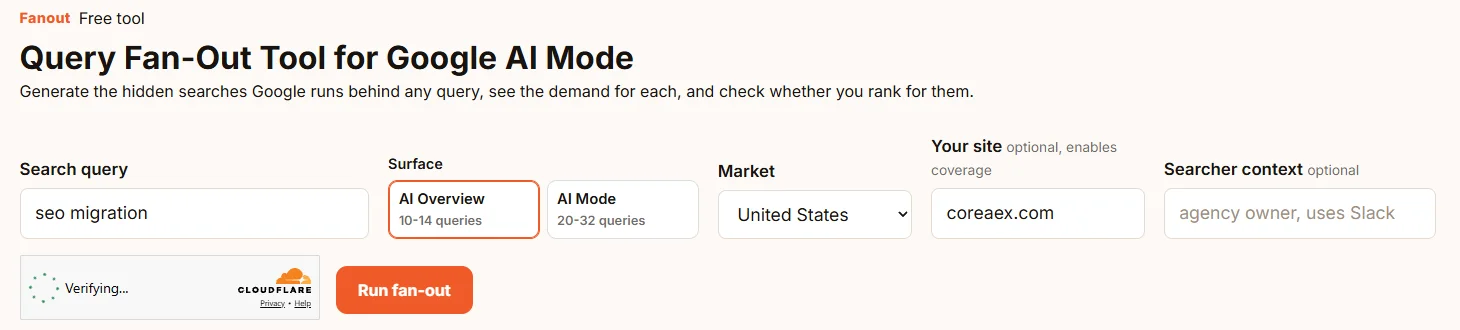
Each IP address gets five fan-outs a day, and every run counts, including a repeat that is served from the cache. Search results, volumes and the simulated sub-queries are cached for seven days, so repeating a run within that window returns the same sub-queries. Changing only the site you enter reuses the cache too. To get a fresh set, use Simulate again on the report.
Read the Report
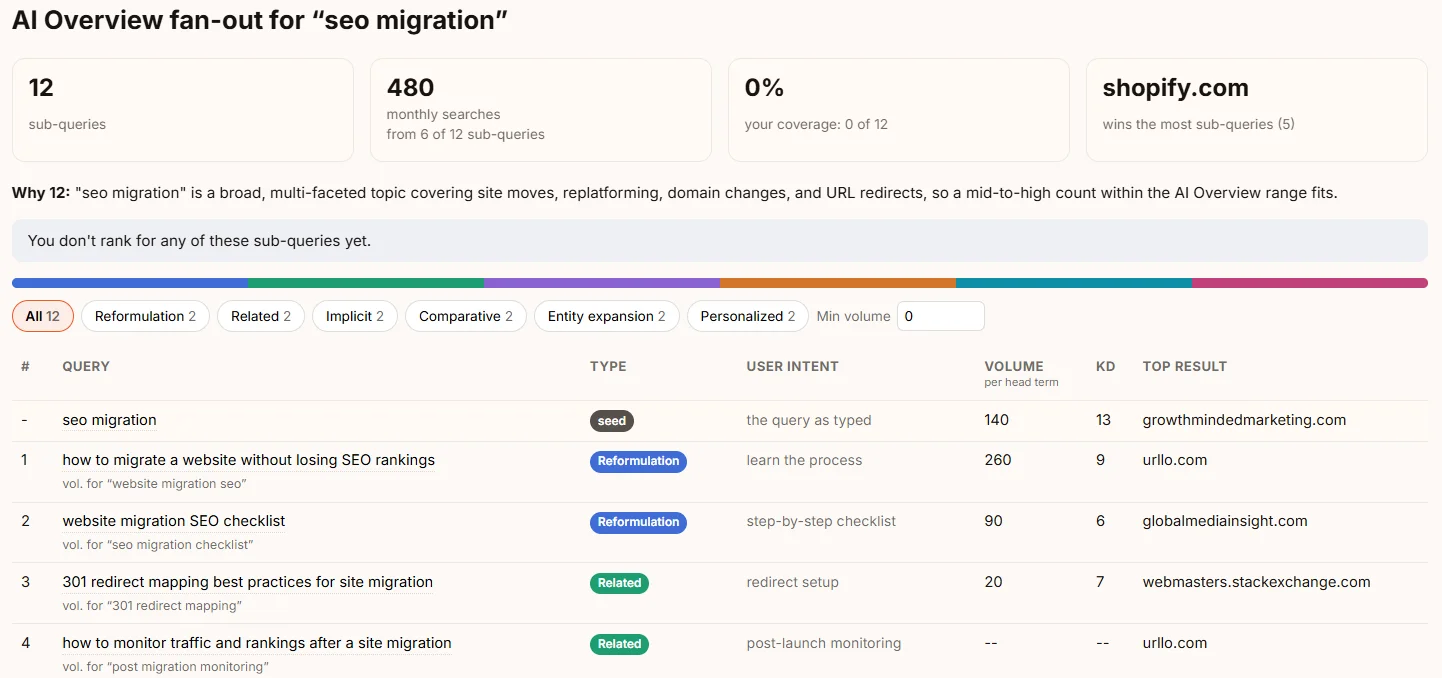
The report opens with four tiles:
- Sub-queries: how many the simulation produced.
- Monthly searches: summed head-term volume, with "from N of M" showing how many sub-queries had volume data.
- Your coverage: the share of sub-queries your site ranks for, if you entered one.
- Who wins: the site that appears for the most sub-queries, or "No clear winner".
Under the tiles, Why N explains why the model chose that many sub-queries. A short explanation for a narrow query and a long one for a multi-part commercial query tells you how broad the topic is.
The six query types
Fanout labels each sub-query with one of six types. They are the same six that iPullRank's Qforia uses, a taxonomy iPullRank drew from Google patent filings. The "usually signals" column is CoreAEX's reading, not part of that taxonomy.
| Type | What it is | What it usually signals |
|---|---|---|
| Reformulation | The same need in other words | Your main page should already answer it. No new page needed. |
| Related | What the searcher is likely to want next | An internal link to the page that answers it, or a short passage. |
| Implicit | An unstated question behind the query | Often the largest content gap on an existing page. |
| Comparative | X vs Y, or alternatives to X | A comparison or alternatives page, if you can support one. |
| Entity expansion | Brands, tools and concepts an answer needs to name | Entities your page should name and explain accurately. |
| Personalized | A version for a specific situation | A section or example for a buyer segment you serve. |
The table and the two leaderboards
Each row shows the sub-query, its type and intent, then Volume (for the head term shown under the query), KD (keyword difficulty), the Top result, and a gap marker where your site was not found. A row reading check failed means the results check for that sub-query did not complete, so it says nothing about your coverage either way. The type filters and Min volume narrow the table, and Copy queries copies the list.
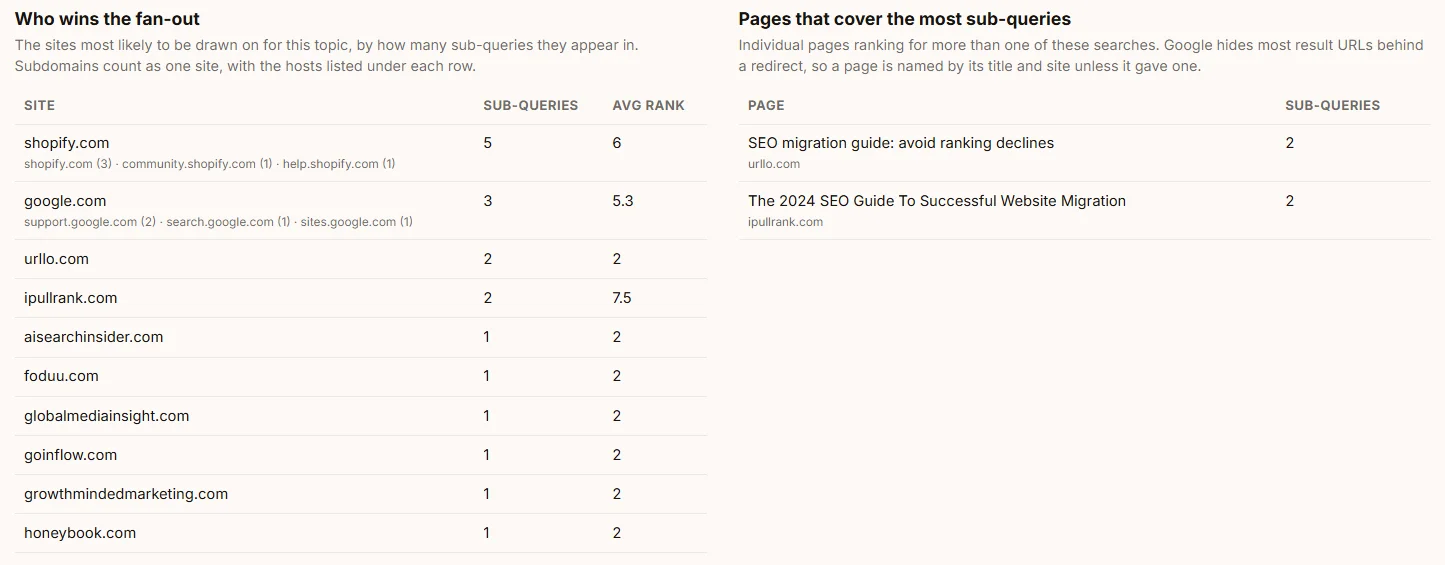
Who wins the fan-out lists the sites that appear for the most sub-queries, with their average rank. Subdomains count with their main site, so a site's help centre and forum add to its total, and the hosts are listed under each row. A site is named on the summary tile only when it appears for at least three sub-queries and more than any other; otherwise the tile reads "No clear winner". Pages that cover the most sub-queries lists the individual results that rank for more than one. Google now hides most result addresses behind redirects, so this list usually shows each page's title and site; search the title to open the page.
What to Do With the Data
RecommendationWork through the report in this order. It follows Google's warning against a page per variation, and it puts the cheapest fixes first.
- Implicit and related gaps: improve the page you have. Add a section, a short passage or a question-and-answer block to the existing page rather than writing one page per sub-query. Link related sub-queries to the page that already answers them.
- Comparative gaps: build comparison or alternatives pages you can maintain. These are separate pages because they serve a separate decision. Competitor Page Scout shows which comparison pages your competitors have already built, and Maintaining SaaS Competitor Comparison Pages covers keeping their claims accurate.
- Entity expansion: name the entities and explain them correctly. Mention the tools, standards or concepts the answer needs, and link to your own pages about them where they exist. Structured data is optional here. Google says no special schema is needed for its AI features; use markup only where it matches visible content and serves rich results.
- A clear winner: study its page, not its words. Find the winner's result in "Pages that cover the most sub-queries", open it, and list the subtopics it covers that yours does not. Copy the coverage, not the copy.
- Reddit or YouTube winning: think before you write. When forums or videos hold the top result for a sub-query, another article may not displace them. Google says its AI features can draw on blogs, videos and forum discussions, and that seeking inauthentic mentions does not help. If a genuine presence on those platforms fits your team, that is the honest route; if not, focus on the sub-queries where written pages win.
- No clear winner: an open topic. No site appears consistently across the sub-queries, so a page that covers them well has less entrenched competition. It is a good moment to publish, not a guarantee of results.
RecommendationTo prioritise, weigh three things: whether the row is a gap, its head-term volume, and its type, with implicit gaps first. Do not drop a sub-query only because its volume shows a dash. The sub-queries are generated per prompt, not chosen from keyword volumes, and Seer's data suggests most real fan-outs have no measurable volume.
After you publish, wait until Google has recrawled the page and the seven-day cache has expired, then run the same query again with the same surface and market to see whether your coverage moved.
Interpret the Results Carefully
- The sub-queries are modelled, not observed. They are a structured prediction of what a fan-out could contain, not a record of what Google ran.
- Fan-outs vary from run to run. In Surfer's test of 1,600 Gemini runs with grounding, only about 27% of fan-out queries recurred across repeated runs of the same prompt, though most fell into a few stable topic clusters. Act on themes, not exact strings: press Simulate again for a second set, and act on the themes that appear in both.
- A dash in the volume column means DataForSEO has no data for that head term. It does not mean nobody searches it.
- Results are per market. A United States run says nothing about the United Kingdom.
- "Results named no site" marks results that came back without an identifiable site, and they are not counted. Google has moved result links behind google.com/goto redirects. DataForSEO says it resolves the destination for almost all organic results, but in Fanout's November 2026 runs between 10% and 30% of results still came back without one, so the tool reports and excludes them.
Worked Example: "seo migration"
We ran "seo migration" on the AI Overview setting, for the United States, with coreaex.com entered, on November 8, 2026. Fanout produced 12 sub-queries, and coreaex.com ranked in the top 10 for none of them. Six of the 12 had volume data, adding up to 480 searches a month. Shopify appeared in the top 10 for five sub-queries, across its main site, its help centre and its community forum, more than any other site.
The 0% is the useful part. CoreAEX already publishes a technical SEO checklist for SaaS migrations and a free Redirect Map Checker, yet neither appears for any of these searches in this market. The gap is not a missing page. It is how the existing pages are framed, what they cover, and how they link to each other.
| Sub-query | Type | Head-term volume | Top result |
|---|---|---|---|
| website migration SEO checklist | Reformulation | 90 (KD 6) | globalmediainsight.com |
| common SEO migration mistakes that cause traffic drops | Implicit | no data | seoclarity.net |
| how long does it take to recover SEO after a migration | Implicit | no data | krawl.digital |
| 301 redirect mapping best practices for site migration | Related | 20 (KD 7) | webmasters.stackexchange.com |
| how to monitor traffic and rankings after a site migration | Related | no data | urllo.com |
Shopify leading is worth a closer look before acting on it. Its five appearances are spread across three parts of its site, all written for store owners moving platforms, and it does not hold the top result for any of the five sub-queries above. That makes this a topic with no entrenched owner for SaaS migrations, which is a better position than it first looks.
The pages list gives the place to start. Two pages each rank for two of the sub-queries: urllo.com's guide to avoiding ranking declines during a migration, and iPullRank's 2024 guide to website migration. Those are the two to open and compare with the CoreAEX checklist.
Three changes follow:
- Make the checklist answer the checklist search. "website migration SEO checklist" is a reformulation of the typed query, with 90 searches a month and low difficulty, and the CoreAEX checklist does not rank for it. Its title and opening say "SaaS website migrations", which is narrower than the search. The fix is to make the opening answer the general question first, then specialise, not to write a second checklist.
- Add the two implicit questions to the same page. Nobody types "what will go wrong" into the original query, but both implicit sub-queries are about it: the mistakes that cause traffic drops, and how long recovery takes. Neither has measurable volume, which is typical for fan-out queries and not a reason to skip them. Each becomes a short section in the checklist rather than a new page.
- Connect the pages that already answer the related searches. A forum thread holds the top result for redirect mapping, a topic CoreAEX already covers in the Redirect Map Checker guide. The checklist should link to it at the redirect step, and gain a short post-launch monitoring section for the other related sub-query.
Just as useful is what we left alone. Two personalized sub-queries assumed an ecommerce store with a large catalog and an agency writing client proposals. We gave Fanout no searcher context, so those rows were example personas, and neither matches the SaaS teams CoreAEX writes for. "Shopify to WooCommerce migration SEO" is a real scenario but not ours either. Skipping them is the point of reading the types rather than chasing every row.
This is one run on one market. It shows where to look, not what Google's AI features will cite.
Fanout and Other Query Fan-Out Tools
Qforia, built by Mike King at iPullRank, was an early and widely cited fan-out simulator, and it set the pattern Fanout follows: two surfaces and six query types. It runs on Gemini, the model family behind Google's AI features. iPullRank says it needs a paid Gemini API key, and it returns each sub-query with its type, intent and a suggested content format. Its documentation describes no search volumes, live rankings or coverage for your domain.
Fanout adds those three: head-term volumes, a live results check for each sub-query, and coverage for your site. It needs no API key, and it can email you the report with a CSV. In exchange, it runs on Claude rather than Gemini and allows five runs a day.
Both share the same limit. Neither can see the fan-out Google actually runs.
Questions About Query Fan-Out
Are these the queries Google actually runs?
No. Google does not publish its fan-out queries, so every tool models them. Treat Fanout's sub-queries as a well-informed guess about the topic's shape.
How many sub-queries does AI Mode use?
Google has not said. Seer's Gemini 3 API test averaged 10.7 per prompt, with a range of 3 to 28, but that measured the model with grounding forced on, not AI Mode itself.
What is the difference between AI Overviews and AI Mode?
Google describes AI Overviews as summaries that appear only when they add something to classic results, and AI Mode as a separate experience for questions that need exploration or comparison. It says the two may use different models and techniques, so their answers and links differ.
Why are some volumes empty?
DataForSEO has no volume data for that head term in your market. Many fan-out searches are too specific to show measurable volume.
How often should I re-run?
After you change the page and Google has recrawled it. A repeat within seven days returns the cached sub-queries and rankings, so wait for the cache to expire before measuring coverage again.
Does it work for languages other than English?
Yes. Sub-queries come out in the language you type the query in, and volumes and rankings come from the market you choose. For Germany, France or Spain, type the query in that market's language; an English query with Germany selected gives English sub-queries checked against German results.
Run your query. Start with one page you already have, run its main query with your site entered, and work through the implicit gaps first.
To see which comparison and alternatives pages your competitors have built, read the Competitor Page Scout guide. To compare a draft with a page that ranks, read the Content Gap Scanner guide. Or see all free CoreAEX tools.
Sources
Opened November 8, 2026.
- Google Search Central, Optimizing your website for generative AI features on Google Search, last updated July 10, 2026. Platform documentation.
- Google Search Central, AI features and your website, last updated December 10, 2025. Platform documentation.
- Ahrefs (Linehan, Guan), Update: 38% of AI Overview Citations Pull From The Top 10, March 2, 2026. Vendor study, Brand Radar data, 863K SERPs, 4M AI Overview URLs.
- Surfer (Suski), Query Fan-Out: What It Is, How It Works, and How to Optimize for It, updated October 22, 2026. Vendor studies: 10,000 keywords and 33,000 Gemini-generated fan-outs; 1,600 Gemini grounding runs.
- Seer Interactive (Haigler), Initial Research: Gemini 3 Query Fan-Outs, November 21, 2025. Agency study, 501 prompts, Gemini 3 API with forced grounding.
- Search Engine Journal, report on AI Overview citation overlap, citing BrightEdge's February 2026 analysis. Secondary reporting.
- iPullRank (King), How AI Mode Works and Query Fan-Out in Practice. Practitioner analysis and tool documentation.
- DataForSEO, Google's Goto Rollout: We Already Resolve 99.99% of URLs, August 27, 2026. Provider announcement.
- CoreAEX, Fanout privacy page: limits, caching, data flow.
About the author
Zarko Zivkovic is the founder of CoreAEX, building technical SEO, AEO, and AI-visibility systems for B2B SaaS companies. Connect on LinkedIn.